 EveryCafe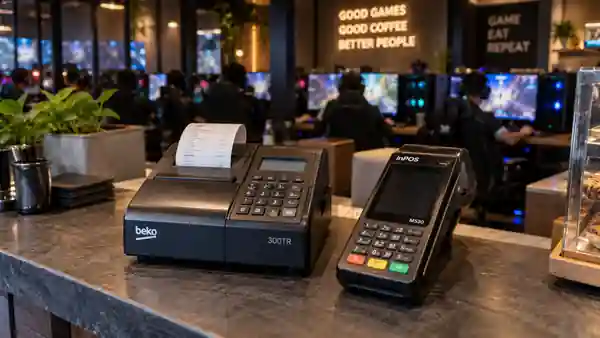
What internet cafe operators in Turkey should check before choosing a New Generation Cash Register, connecting a POS terminal, and organizing checkout.
POS use and New Generation Cash Register rules in Turkish internet cafes
Checkout begins when a customer ends a session. PC time and food or drink orders may appear on the same table bill. The cashier reviews the total and records each payment as cash or card. Treating POS as part of the full checkout process keeps cash and card movements correctly separated in till reports.
In Turkey, GİB states that taxpayers covered by the New Generation Cash Register (Yeni Nesil ÖKC) requirement must, from July 1, 2024, have a merchant agreement with at least one bank, other institution, or payment service provider and accept bank or credit card payments through every YN ÖKC. The exact obligation can depend on an internet cafe’s tax status and activities. Confirm it with your accountant or tax office before investing in a device.
- Separate card, cash, and other payment methods
- Assess the device model together with integration support
- Aim to match receipt, payment, and till records in the same transaction
- Test peak-hour scenarios before launch
POS integration reduces repeated work and checkout errors
Without integration, a cashier may need to enter the table total again on the POS terminal. During a rush, this repetition can lead to an incorrect amount or payment method and makes end-of-shift checks harder.
With a supported POS terminal, the amount can be sent to the device and the result returned to the checkout flow. Integration does not remove every manual step, but it helps reduce duplicate entry and incorrect card records. Correct department and VAT mappings for sessions, orders, USB drives, or printing also make receipts, payments, and till records easier to trace together.
Consider technical compatibility, not just the bank’s offer
GİB’s approved list includes Beko 300TR, Beko X30TR, Hugin Tiger S1, and inPOS M530 among EFT-POS-enabled New Generation Cash Registers. EveryCafe provides integration flows for inPOS M530, Hugin S1, Beko 300TR, and Beko X30TR.
Setup differs by model. inPOS M530 uses an Ethernet connection and external EKÜ (electronic recording unit); Hugin S1 must share the network with the main PC; Beko 300TR/X30TR requires wired integration activation through TokenINC AppStore, Every Cafe as the integrator, and the correct device model.
Test split payments and group bills from the start
A group may pay part of its bill in cash and the rest by card. Each amount needs its own payment method, or the physical cash and card transactions may not match at the end of the day.
Split payment is a separate scenario and should not be confused with POS integration. The card portion may go through a supported terminal while the cash portion is recorded correctly in the till. Together, those records show how the full bill was settled.
A short POS setup checklist
A successful terminal payment is not the end of testing. Close a table bill containing a session and orders with cash and card separately, then confirm that each collection appears under the right method in till reports. This helps expose differences before a real shift.
- Check the device’s official approval and integration status
- Complete network, pairing, and connection tests
- Verify department and VAT mappings
- Try card, cash, and split payments
- Check cancellation and failed-payment flows
RELATED EVERYCAFE PAGES
Treat the POS terminal as part of your operation, not a standalone checkout device.
Explore POS integration